
How to download a whole Google Drive folder
Updated October 23, 2026
Downloading a big folder through the browser often goes wrong. Google zips everything, splits it into 2 GB parts and, if your connection drops halfway, you start again. There is another way: download file by file, with resume.
Why folder downloads fail in the browser
When you click "Download" on a folder, Google Drive first builds a compressed file on its servers. For large folders this takes a while, sometimes fails, and the result comes in several parts. Each part is a separate download that the browser cannot resume well. If one of them breaks, the whole zip can become useless.
When each file is downloaded on its own, a problem with one file does not ruin the others, and each one can continue from where it stopped.
Before you start
- The folder must be shared as "Anyone with the link". If it is your folder, open Drive, right-click the folder, choose Share and change General access.
- If it belongs to someone else, ask them to do it. A restricted folder will not open in any program without signing in.
- Check that you have enough free space on your disk or phone for the folder.
Step by step
- Copy the folder link. In Drive, right-click the folder and choose "Copy link". It looks like
drive.google.com/drive/folders/.... - Paste it into Nitro Downloader. On a computer, open the program and press
Ctrl+Vin the link field. On a phone, tap the plus button and paste the link. - Wait for the list. The program asks Google for the list of files in the folder. For folders with thousands of files this can take up to two minutes.
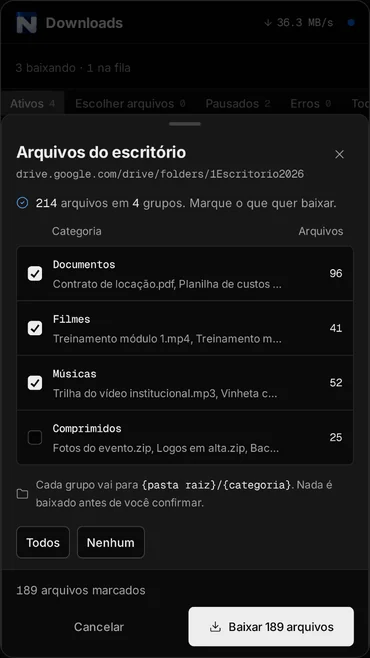
- Choose what to download. Files are grouped by type: documents, movies, music, archives. Tick whole groups, or open a group and pick file by file.
- Confirm. Every file becomes its own download in the queue, with speed, time left and resume.
Common problems
"Download quota exceeded"
Google limits how many times a file can be downloaded within 24 hours. When a file is downloaded a lot, it gets blocked for a while. There is nothing a program can do about it. Wait a few hours and try again or, if you have a Google account, make a copy of the file in your own Drive and download the copy.
The list does not show up
It is almost always the sharing setting. Open the link in a private browser window. If it asks you to sign in there, the folder is not public and the program will not see it either.
Google Docs, Sheets and Slides files
Documents created directly in Google are not regular files, they are pages inside Google. To take those, use Google Takeout or export each one from the File menu of the document itself.
Tip: download to the right place
Nitro Downloader sorts files by type automatically. Movies go to one folder, music to another, documents to another. If you prefer a different place, change the destination folder in the settings before confirming the download.